gStocks tokenized equities on the Gate platform are traded through an order book matching mechanism, closely mirroring the process for digital asset trading. However, the underlying assets are tokenized units pegged to publicly listed stocks. Before placing any orders, you must fully understand the gStocks tokenized equities anchoring mechanism and the product’s specific boundaries.
The repeatable workflow follows: Preparation → Funding Allocation → Asset Search → Order Execution → Fee Verification → Risk Check. This applies to both your first trade and any subsequent position increases. All field descriptions are based on the actual interface of the Gate App or web platform.
What Do You Need to Prepare Before Trading gStocks on Gate?
Before trading gStocks, users must:
- Register and complete Gate account identity verification (KYC)
- Confirm that gStocks and related tokenized stock services are available in your region
- Enable a unified account or stock trading permissions (if a separate toggle is required on the product page)
- Prepare USDT or other supported quote assets that are available for trading
| Preparation Item |
Checklist |
Common Oversights |
| Account Status |
KYC complete, unrestricted account |
Failure to complete advanced verification, resulting in limited quotas |
| Regional Availability |
Check restricted regions in the user agreement and announcements |
Assuming global availability |
| Trading Permissions |
Access to Stocks/gStocks section |
Not enabling related product lines |
| Available Funds |
USDT balance meets minimum threshold |
Funds are in Earn or frozen state |
These are the four key preparation steps. Gate may restrict or prohibit certain services in specific regions. Review the user agreement and the regional guidelines in gStocks Risk and Compliance Boundaries before getting started.
Step 1: How to Prepare USDT and Your Trading Account?
USDT is the primary trading and settlement asset within the Gate ecosystem. You can transfer USDT to your Gate unified account via P2P, on-chain deposit, or fiat deposit, and must ensure your funds are "available"—not "frozen" or "locked in Earn." The minimum trading threshold for gStocks is approximately 1 USDT, though it’s recommended to keep a balance slightly above your planned order size to cover fees and price fluctuations.
Once your unified account is enabled, you can manage gStocks positions alongside crypto assets. If you plan to use margin or lending features, make sure you’ve enabled the necessary permissions and reviewed risk controls. After your funds are ready, go to the [Stocks] or [gStocks] section in the Gate navigation and confirm the asset list and order book load correctly.
Step 2: How to Search for gStocks Assets on Gate?
In the gStocks or Tokenized Stocks section, use the search box to enter the asset name or code (e.g., TSLAG, AAPL—actual codes are based on the platform’s listings). Search results display the tokenized equity’s name, underlying stock, price, and order book depth.
| Checklist |
Key Points |
| Code Accuracy |
Make sure the gStocks code matches the intended underlying stock |
| Name Consistency |
Verify the full company name or common abbreviation |
| Price & Depth |
Review buy and sell orders to assess liquidity |
| Product Description |
Check the asset’s anchoring mechanism and rules summary |
Once you select an asset, click to enter the trading page and confirm the order book, candlestick chart, and trading panel display correctly. Each gStocks asset is linked to a specific underlying stock—do not confuse assets with similar codes. For details on the 1:1 anchoring relationship, see gStocks 1:1 Backing and Conversion.
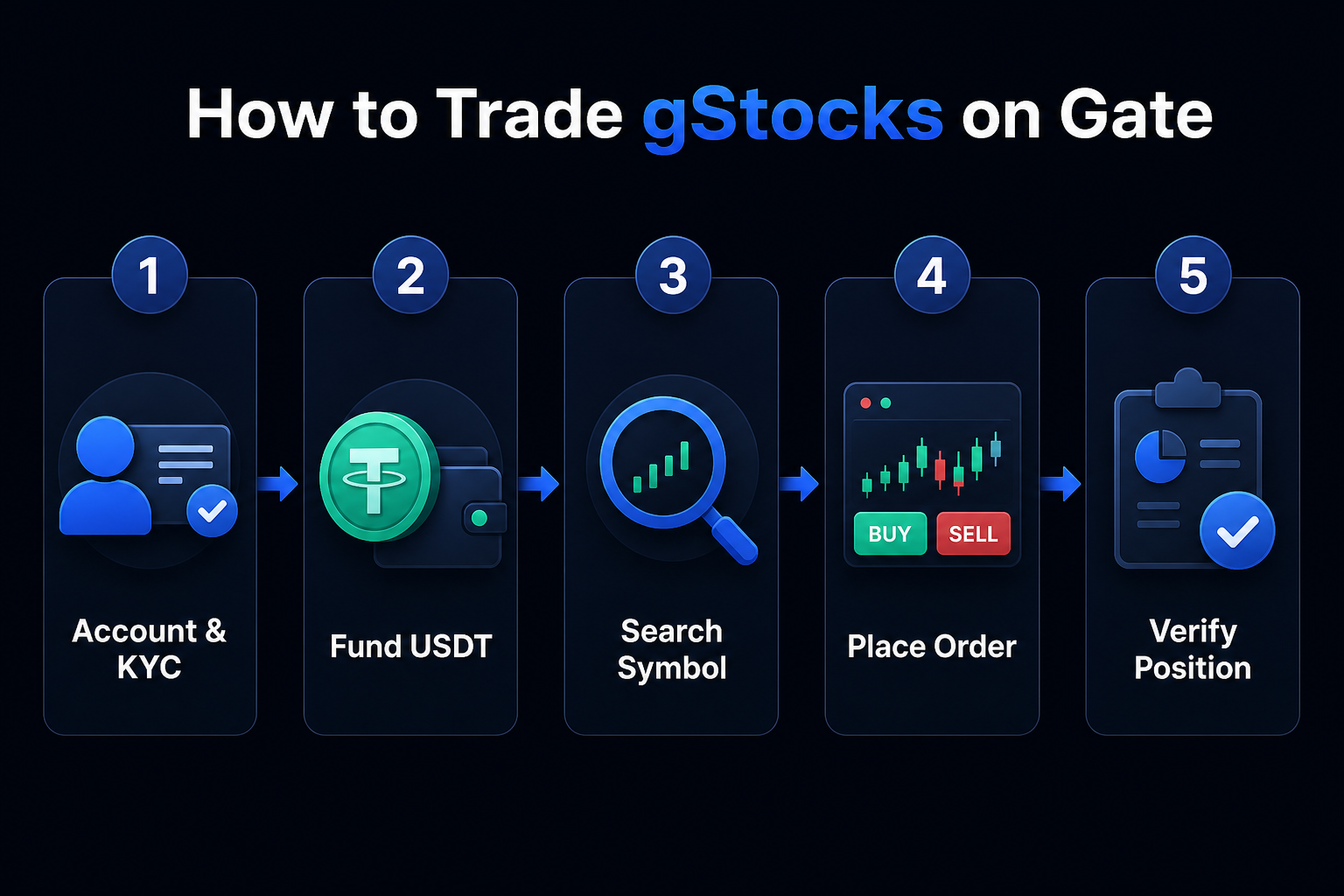
Figure 1. Step-by-step process for trading gStocks on Gate: funding preparation, asset search, order placement, and transaction verification.
Step 3: How to Place Buy or Sell Orders for gStocks?
On the trading page, select the order type (such as limit or market order, as supported by the platform), enter the quantity and price (for limit orders), and confirm the total order amount and estimated fees before submitting your order. Limit orders are executed at your specified price or better; market orders fill as quickly as possible based on current market depth and may be subject to slippage.
Buy Process: Select [Buy] → enter quantity or amount → confirm price and fees → submit order → check status in [Open Orders] → after execution, review in [Positions].
Sell Process: In [Positions], select the relevant gStocks asset → select [Sell] → enter quantity → confirm and submit → after execution, check your USDT balance and position changes.
Before submitting, double-check: order direction (buy/sell), asset code, quantity, order type, and whether you have sufficient available funds. After execution, verify in [Positions] that your gStocks quantity and cost match your expectations.
What Fees and Order Rules Should You Confirm When Trading gStocks?
gStocks trading fees follow Gate’s tokenized stock product rate standards, which may include Maker/Taker fees or special platform rates. The order interface typically displays estimated fees, but your transaction bill provides the final figures. In addition to trading fees, you may incur extra charges for fund transfers, withdrawals, or cross-product operations—refer to the official fee schedule for details.
| Fee/Rule Type |
Where to Check |
Description |
| Trading Fee |
Order estimate, transaction bill |
Maker/Taker or special rates |
| Minimum Order Size |
Product page, order panel |
Approximately 1 USDT; subject to actual value |
| Order Validity |
Limit order settings |
GTC, IOC, etc. (if supported) |
| Dividend Settlement |
Positions details, announcements |
Automatically distributed—no manual claim required |
Fees and rules may change as the product evolves. Always check the latest Gate fee standards and gStocks product announcements before trading. For auto-invest and trading bots (if enabled), confirm strategy parameters and fee structures separately.
What Risks Should You Understand Before Buying or Trading gStocks?
Execution risks include: selecting the wrong asset code, misunderstanding order types, unexpected slippage on market orders, and insufficient funds resulting in failed orders. Market risks include price volatility in the underlying stock affecting gStocks value. Regulatory risks include regional restrictions, product term changes, and feature availability.
Separate your understanding of "company/asset fundamentals" from the "Gate trading process": the former helps assess if your exposure aligns with your objectives, while the latter ensures you correctly handle codes, orders, fees, and position verification. See gStocks vs Traditional Stocks vs CFD to clarify product boundaries and avoid confusing gStocks with CFDs or traditional broker holdings.
Summary
The repeatable workflow for trading gStocks on Gate is: complete account and regional eligibility checks → prepare available USDT funds → search and verify assets in the gStocks section → select order type and submit your order → review execution and fees in [Positions] and [Bills]. The minimum threshold is about 1 USDT, and fractional shares are supported. During execution, always monitor the anchoring mechanism, fee policies, and gStocks Risk and Compliance Boundaries.
FAQ
What Is the Minimum USDT Required to Buy gStocks?
The minimum trading threshold for gStocks is about 1 USDT, and fractional share purchases are supported. The actual minimum order unit is shown on the Gate product page and order panel.
Can gStocks Be Traded 24/7?
gStocks support 24/7 trading (refer to Gate product announcements). Trading hours differ from traditional exchanges, and liquidity may vary by time. Always check order book depth before placing orders.
Is Buying gStocks on Gate the Same as Buying Stocks?
The process is similar (search, order, position), but gStocks are tokenized securities backed 1:1 by real stock reserves. Account structure and rights differ from traditional broker stocks. For details, see gStocks vs Traditional Stocks vs CFD.
How Do You Confirm Your Position After Execution?
In the Gate [Positions] section, check the gStocks asset code, holding quantity, and cost. In [Bills] or [Trade History], verify transaction amount, fee, and time. If anything is inconsistent, contact customer support promptly.
What Should You Check Most Carefully Before Trading gStocks?
Prioritize: account and regional eligibility, available USDT balance, asset code and name, order type and estimated fees, and post-trade position verification. Diligence in these five areas will greatly reduce operational errors.